TinyCorp's Chestnut + RTX 5090: So Close, So Far
by John Robinson @johnrobinsn
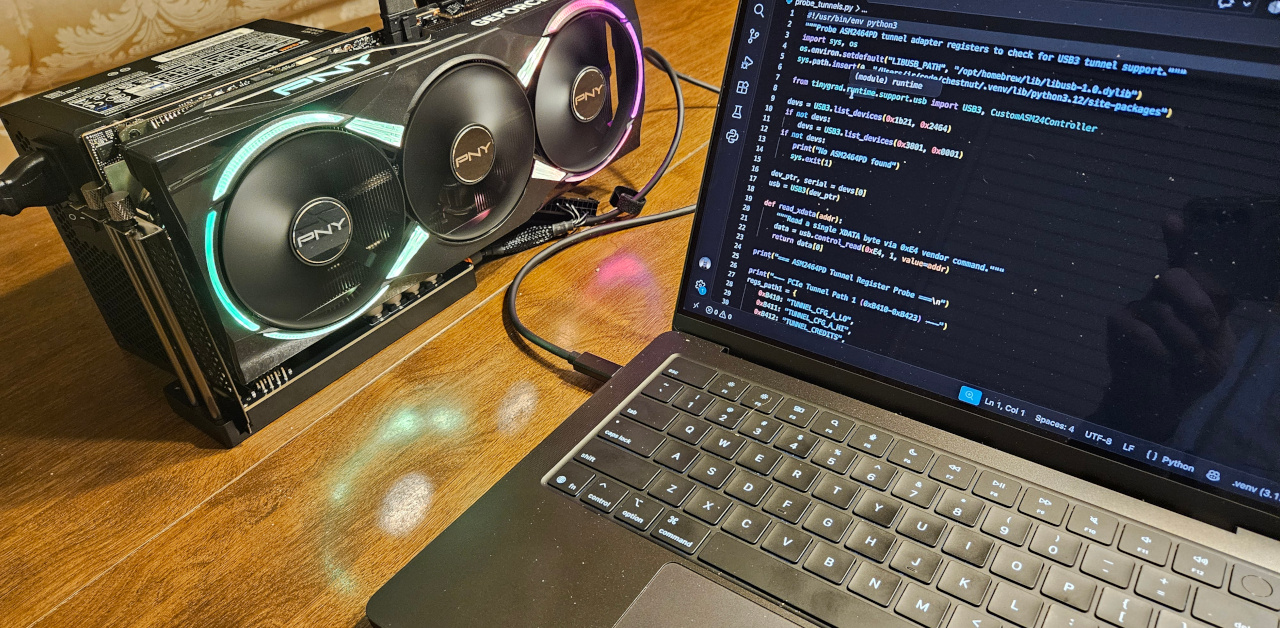
Running a desktop GPU from a laptop over a single cable is no longer speculative. People are already doing it — an RTX 5090 in a Thunderbolt enclosure, connected to a Mac, driving inference through tinygrad's userspace stack with no NVIDIA kernel driver in sight. Notebookcheck measured 7.48 tok/s on Llama-3.1-8B on exactly that setup. It works.
Cheaper USB4 bridge boards exist — the ADT-Link UT3G runs the same ASMedia chip for about $110. But when TinyCorp started selling the chestnut at $249, I bought it anyway. The firmware is fully open source — real C you can read, modify, and flash. And the money supports the tinygrad project, which is building the only stack that can drive an NVIDIA GPU on a Mac without NVIDIA's cooperation. That felt worth backing.
I slotted in an RTX 5090, plugged it into my MacBook Pro M5, and expected it to work the same way. Same ASMedia bridge chip, same tinygrad stack. How different could it be?
Very different, it turns out. The gap between "works in a Thunderbolt enclosure" and "works on the chestnut" isn't price — it's firmware.
The 5090 is in there. I can prove it. I just can't use it — yet.
The stack that makes this possible #
Before getting to what went wrong, it's worth understanding what TinyCorp has built, because the ambition is genuine and the engineering is real.
tinygrad is a deep-learning framework written from scratch by George Hotz and the TinyCorp team. It's deliberately small — the repo enforces a hard line-count ceiling on the core. Beneath that constraint is a lazy-evaluated computation graph that lowers through a UOp-based IR to multiple backends: Metal, NVIDIA, AMD, LLVM, WebGPU, and others. Real models run on it. Llama, Stable Diffusion, YOLO. It's CI-tested across backends, including Blackwell's sm_120.
The bet that matters for this story: tinygrad owns the GPU driver layer. The NVIDIA runtime (ops_nv.py) talks directly to the GPU's GSP-RM firmware over PCIe — no CUDA runtime, no libcuda.so, no NVIDIA kernel driver. On Linux, a tunneled eGPU just shows up as a normal PCIe device and the stock NVIDIA driver works too. But on macOS, where Apple killed NVIDIA kernel support in 2018, tinygrad's userspace approach is the only path. That's what makes a 5090 on a MacBook possible at all.
The bridge between the Mac and the GPU is TinyGPU, a DriverKit extension signed and notarized by Apple. It's compute-only — no display output, no graphics API — but it gives tinygrad's runtime access to PCIe devices tunneled over USB4/Thunderbolt. In a Thunderbolt enclosure, this stack already works. The question was whether the chestnut could deliver the same thing.
The hardware #
The chestnut is comma.ai's eGPU dock, originally designed as a compute upgrade for the comma four self-driving platform. The bridge chip is an ASMedia ASM2464PD, running TinyCorp's open-source firmware — real open-source, not "open" with an asterisk. C code compiled with SDCC, targeting the chip's 8051 core — yes, the 1980 Intel 8-bit microcontroller architecture, still everywhere in embedded silicon because it costs almost nothing in die area. The firmware fits in about 9KB. The whole thing is auditable.
The dock exposes PCIe 4.0 x4 downstream to the GPU and connects to the host over a USB-C cable. The product page says "use it over usb 4." It ships in two SKUs: the $249 dock-only ("tiny chestnut," BYO GPU and PSU) and a $799+ bundle with an AMD RX 9060 and in-vehicle harnessing. I ordered the dock-only.
My setup: MacBook Pro M5 (32 GB, macOS 26.6), RTX 5090 seated in the dock, external ATX PSU connected via 12V-2x6 cable. When I plugged in the USB-C cable, the 5090's fans spun up. Power was flowing. Something was alive.
Nothing happened #
I installed TinyGPU, activated the DriverKit extension, installed tinygrad, and ran:
DEV=NV python3 -c "from tinygrad import Device; print(Device.DEFAULT)"
No GPU found. Zero devices.
I checked the Thunderbolt bus. Nothing. Checked IORegistry for PCIe devices. Nothing. The 5090 wasn't showing up on the PCI bus at all.
This is where the story forks from every existing walkthrough. Notebookcheck's setup, scottjg's MacBook Air testing, TinyCorp's own demos with the ADT-Link UT3G — all of them used Thunderbolt/USB4 enclosures. The GPU appeared on the PCI bus. TinyGPU claimed it. tinygrad talked to it. Clean path.
The chestnut isn't doing that. And the reason is in the firmware.
Finding the 5090 the hard way #
The chestnut showed up as a USB device — vendor 0x1b21 (ASMedia), product 0x2464. That's the ASM2464PD bridge chip, connected over USB3. Not USB4.
tinygrad's AMD backend has a full USB3 code path for talking to GPUs through the ASM2464PD. It uses libusb to send vendor-specific control messages that read and write PCIe configuration space and memory through the bridge chip. It's how AMD GPUs work on the chestnut over USB2, USB3, and USB4 — the whole matrix.
I borrowed that library to walk the PCIe topology manually:
from tinygrad.runtime.support.usb import USB3, CustomASM24Controller

devs = USB3.list_devices(0x1b21, 0x2464)
ctrl = CustomASM24Controller(devs[0])

# Read vendor/device ID at bus 2, the downstream slot
vid = ctrl.pcie_cfg_req(2, 0, 0, 0x00, 2)  # vendor ID
did = ctrl.pcie_cfg_req(2, 0, 0, 0x02, 2)  # device ID
Bus 0: ASM2464PD upstream port.
Bus 1: ASM2464PD downstream bridge. Gen3 x2 link active.
Bus 2: 0x10de:0x2b85.
That's the RTX 5090. Present, powered, link trained. I could read its config space. The GPU is right there.
But the bridge's bus registers weren't configured — primary, secondary, and subordinate bus numbers were all zeros. The firmware doesn't set them up at boot. After manually writing the bus topology via USB3 PCIe config writes, the full hierarchy was visible. The 5090 exists, electrically and logically, behind the chestnut's bridge chip.
I just have no way to compute on it.
The two gaps #
There are two independent software gaps, and either one closing would make this work.
Gap 1: The firmware doesn't do USB4. USB4 includes PCIe tunneling — the protocol that makes a device behind the cable appear on the host's PCI bus. The ASM2464PD supports it. TinyCorp's firmware added USB4 in PR #61, then removed it with the commit message "revert usb4 slop." Issue #86 tracks the gap. It's open, with no resolution and no bounty.
If USB4 worked, the 5090 would appear as a PCIe device on the Mac, TinyGPU would claim it, and tinygrad's existing NV backend would drive it. Zero tinygrad changes needed.
Gap 2: tinygrad's NV backend has no USB3 path. The AMD backend (ops_amd.py) imports USBPCIDevice, CustomASM24Controller, and the USB3 class. It can discover, configure, and drive AMD GPUs through the ASM2464PD over USB. The NV backend (ops_nv.py) has none of this. It finds GPUs through /dev/nvidiactl on Linux or an IOKit PCI scan on macOS. No USB. The official support matrix says it plainly: NVIDIA is USB4 only.
If an NV USB3 path existed, the 5090 could be driven through the chestnut without USB4 firmware at all — just like AMD GPUs are today.
Why the NV USB3 path doesn't exist #
This is the part I found most interesting, and the reason it's not just a missing afternoon of work.
AMD GPUs initialize by direct register writes. You poke MMIO registers, set up memory, configure the GPU's command processor, and start submitting work. The USB3 transport layer handles those register writes fine — tinygrad's USBMMIOInterface proxies MMIO reads and writes through the ASM2464PD's SRAM, double-buffering through a 512KB window on the bridge chip.
NVIDIA GPUs don't work that way. Before you can do anything useful with a modern NVIDIA GPU, you have to boot GSP-RM — NVIDIA's GPU System Processor firmware, essentially a small OS running on the GPU. The boot process requires DMA queues in system memory: the host allocates ~580KB of command and status buffers, the GPU reads and writes them via DMA, and the two sides coordinate through those shared queues.
Over a normal PCIe connection, "system memory" is host RAM — fast, plentiful, directly addressable. Over USB3, the only memory the GPU can DMA to is the ASM2464PD's SRAM.
The SRAM is 512KB. The GSP-RM queues need ~580KB.
It doesn't fit.
This isn't a software limitation you can engineer around with cleverness. The bridge chip's SRAM is a fixed hardware resource. The firmware boot protocol is defined by NVIDIA. The numbers don't work. You'd need to stage the queues, implement a virtual memory layer over USB, handle the timing constraints of a firmware boot handshake across a high-latency USB link — and none of that exists.
That's why tinygrad lists NVIDIA as USB4-only and AMD as USB2/3/4. It's not an oversight. It's a reflection of a fundamental architectural difference in how these GPUs initialize.
What the product page says vs. what the firmware does #
The comma.ai shop page says "use it over usb 4." The shipping firmware is USB3-only. This isn't buried — it's the central tension. The hardware supports USB4. The bridge chip supports USB4. The firmware did, briefly, and then the code was reverted.
To be fair, the chestnut was designed for the comma four platform, where the primary use case is an AMD RX 9060 in a car. AMD works over USB3. For that audience, the dock delivers. The USB4 gap only bites when you try to use an NVIDIA GPU on a Mac — which is exactly the configuration I walked in with.
Someone already wrote the fix #
Here's where the story turns.
While researching the USB4 firmware gap, I found an open PR on a fork of the firmware repo that restores the USB4 stack and fixes the two bugs that blocked PCIe tunneling. The author identified the root causes by disassembling ASMedia's stock firmware for comparison:
-
A tunnel-event acknowledgment was gated behind a mode check. The W1C (write-1-to-clear) bits that signal "PCIe link ready" were inside a
route_modeconditional. When the gate was shut, the pending bit starved the entire dispatch chain and the GPU's PERST was never released. Stock firmware acks first, gates second. -
A PD timeout overwrote a live USB4 route. A one-second sender-response timeout unconditionally wrote "USB3 direct, no tunnel" — even after USB4 was fully established. This shut the gate from bug #1 on a device that had just finished bringing the tunnel up.
The result: 10/10 consecutive dock resets with an RTX 3090 tunneled over USB4, including 4096×4096 matmul running over the link. Tested on an Intel Maple Ridge TB4 host on Linux.
The PR hasn't been merged upstream. The sticking point is a tradeoff: adding the USB4 stack costs ~4.5 seconds on USB3-only hosts (like the comma four), because the firmware tries USB4 first and has to timeout before falling back. For a self-driving car that boots a 1.8GB model over this bridge, those seconds matter. The fix — enumerating USB3 immediately and transitioning to USB4 if the host requests it — is well-understood but hasn't been built yet.
Where this leaves things #
For AMD GPUs, the chestnut works today across USB2, USB3, and USB4, on Linux and macOS. Comma.ai's "compute upgrade for the comma four" pitch is honest for that configuration.
For NVIDIA on the shipping firmware, the answer today is: use a USB4 bridge that does PCIe tunneling out of the box — the ADT-Link UT3G or similar. Same ASMedia chip, stock firmware with USB4 enabled. TinyGPU claims the GPU, tinygrad drives it. That's the path that works now.
But the gap is narrower than it looks. The USB4 firmware exists, it's tested, and it's open source. I built both images — stock and USB4 — from source, and flashed the USB4 branch onto my chestnut. The first plug after flashing was promising: macOS prompted me to authorize a PCIe device, which means the USB4 tunnel came up long enough for the Mac to see something on the other side. Then it disappeared and hasn't come back — the firmware's USB3 fallback, which works on Linux, doesn't recover on Apple Silicon. The dock is currently bricked from the Mac's perspective. I'll reflash it to stock from a Linux machine and keep digging.
I came in expecting to train a model on a 5090 through a USB cable. I didn't get that — yet. What I got was a clear picture of where the edge is: the hardware works, the GPU is there, and the USB4 tunnel briefly flickered to life before Apple Silicon's USB4 controller killed it. A follow-up article will cover what I find when I get the dock back and start debugging the firmware in earnest.
So close. So far.
Get more content like this. Occasional, low-cadence, real-news-only.
Follow along at storminthecastle.com — or reply if you're building in this space.
Share on Twitter | Discuss on Twitter
John Robinson © 2022-2026