A Local Voice Agent on a MacBook in Under 2 GB
by John Robinson @johnrobinsn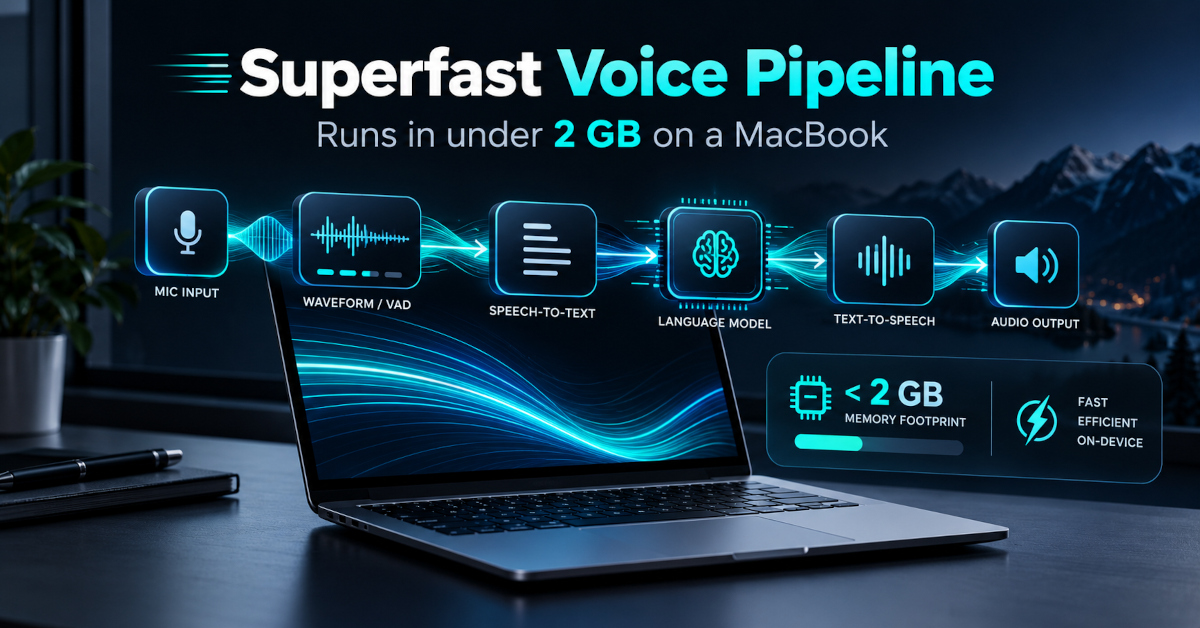
I've been building voice into my agent setup for a while (see Towards an always-listening voice agent), and most of that work assumed a Linux box with a big NVIDIA card. Then I started using an M5 MacBook Pro as my daily machine, and the obvious question came up: how much of the voice loop can run well on the laptop itself, without the GPU server and without the cloud?
It turns out: all of it, and comfortably. The voice pipeline in this post (listening, deciding when you've finished talking, transcribing, and speaking the reply) runs in 1.4 GB, gets the first sound of a reply out about 350 ms after you stop talking (before any LLM time), and doesn't load PyTorch at all.
I pulled it out into a small standalone repo, macvoice, so you can run it, read it in an afternoon, and plug in whatever brain you like, including Claude Code over ACP.
The loop #
 mic ──▶ Silero VAD ──▶ Smart Turn ──▶ Parakeet ──▶ your LLM ──▶ Phonon ──▶ speaker
        is it speech?   are they done?   what did      what to      say it
                                         they say?     answer?
| Stage | Model | Runs on | Cost per turn (M5) | License |
|---|---|---|---|---|
| Voice activity | Silero VAD v6 | ONNX Runtime, CPU | 0.07 ms per 32 ms chunk | MIT |
| End of turn | Smart Turn v3.2 (pipecat) | ONNX Runtime, CPU | 11 ms | BSD-2 |
| Speech to text | Parakeet TDT 0.6B v2, 8-bit | MLX, GPU | 60 ms | CC-BY-4.0 |
| Text to speech | Phonon 31M English | Rust runtime, Metal | 4 ms to first audio | Apache-2.0 |
| Brain | anything OpenAI-compatible, or an ACP agent | wherever you like | varies | varies |
Everything is permissively licensed, which matters if you want to ship it. (That wasn't true of every model I started with.)
The glue is plain Python: a pure-function endpointer, a responder that runs ASR → LLM → TTS and records where the time went, and a live loop that wires those to the microphone and speaker. The loop itself, echo cancellation included, is about 1,400 lines of Python, plus a CLI, the benchmarks and the ACP client.
The numbers #
Here's the loop against the stack I started from on the Mac: Whisper large-v3 on PyTorch's Metal backend (fp16, with distil-large-v3 as a speculative-decoding assistant), Kokoro for speech, and a fixed 1.5-second silence timer to decide you were done. Same machine (M5, 32 GB, on AC power), same clips, measured by macvoice bench:
| Whisper + Kokoro + silence timer | macvoice | |
|---|---|---|
| PyTorch in the process | yes | no |
| Speech recognition (p50) | 404 ms | 60 ms |
| Word error rate (20 LibriSpeech clips) | 4.4% | 4.4% |
| Speech, first audio (p50) | 212 ms | 4 ms |
| End of speech → turn over | 1,504 ms | 299 ms |
| End of speech → first reply audio | 2,027 ms | 347 ms |
| Memory, models loaded | 5.4 GB | 1.3 GB |
| Memory, after the run | 6.1 GB | 1.4 GB |
The end-to-end rows use an "echo" brain that repeats you back, so they measure the voice pipeline alone. Memory is the process's physical footprint, which includes GPU allocations (more on why that matters below).
Two things jump out. The models got faster and smaller, but the biggest latency win is the row that isn't a model at all: deciding when you're done talking.
What made the difference #
1. Parakeet on MLX, quantized to 8 bits #
NVIDIA's Parakeet TDT 0.6B is a transducer, not an encoder-decoder like Whisper. It doesn't generate text token by token with a big decoder, so it is fast by construction. The parakeet-mlx port runs it natively on Apple's GPU at about 60× real time here.
I quantize the encoder (about 99% of the weights) to 8 bits with one line, mlx.nn.quantize(model.encoder, group_size=64, bits=8). On a 10,000-utterance English test set (LibriSpeech, AMI meetings, Earnings-22 calls, Common Voice, and speech mixed with kitchen and café noise), 8-bit was statistically indistinguishable from bf16 while using about 0.9 GB less memory and running about 23% faster. At 4 bits it starts to slip in heavy noise, so 8 is the sweet spot.
2. Turn detection matters more than any model #
A fixed silence timer has two settings, and both are wrong. Make it short and it cuts people off when they pause to think: "I'd like to book a table for, um…". Make it long and every reply waits for it. The 1.5-second timer I had was the single largest item in my latency budget.
macvoice asks a model instead. After 300 ms of silence it hands the turn's audio to Smart Turn, a tiny Whisper-tiny-based classifier that listens for prosody, the falling pitch of a finished sentence versus the hanging "um". If it says "done" (P ≥ 0.5), the turn ends right there. If it says "not done", the endpointer keeps listening for up to 3 seconds, and if you start talking again it's the same turn.
The one detail that matters: give Smart Turn the audio up to where speech stopped, not the silence after it. Trailing silence reads as "finished" to the model. In my testing its ability to separate finished from unfinished turns dropped from an AUC of 0.93 with no trailing silence to 0.62 with one second of it, which defeats the point of asking. The endpointer trims before it asks.
Here's what the policies do on 96 synthesized test utterances (4 voices; macvoice bench turns):
| Policy | Ends a finished turn after | Cuts off "…for, um," + 2 s pause | Cuts off a bare mid-sentence 2 s pause |
|---|---|---|---|
| Fixed 500 ms silence | 512 ms | 100% | 100% |
| Fixed 1.5 s silence | 1,504 ms | 100% | 100% |
| Smart Turn after 300 ms, wait up to 3 s | 288 ms | 0% | 88% |
It ends finished requests five times sooner than the 1.5-second timer and never cut anyone off after a filler word. Bare fragments ("Can you remind me to call…") are mostly judged finished, but treat that column with care: the test speech is synthesized, and a TTS voice given a fragment reads it with sentence-final intonation. A person trailing off doesn't sound like that. On real human recordings (pipecat's test set) Smart Turn gets about 96% right.
3. Stream everything on the way out #
Phonon is a 31M-parameter TTS from Gradium with a Rust runtime. It streams audio frame by frame as its decoder produces it, so the first sound is ready in about 4 ms instead of after a whole sentence. It also brings no PyTorch and no GPL phonemizer (Kokoro's English front end pulls in espeak-ng).
On the input side of TTS, the responder cuts the LLM's streamed reply into sentences as tokens arrive and starts speaking the first one immediately. With those two together, the time to first audio is ASR + time to the LLM's first sentence + a few milliseconds.
4. Keep PyTorch out of the process #
PyTorch is wonderful, but you pay for it in memory even when you barely use it. The runtime itself is modest; the cost is what the Metal backend caches once anything touches the GPU. So macvoice doesn't import it:
- Silero VAD runs its ONNX model directly. The official package wraps that ONNX model in a small PyTorch class just to carry state between calls; that's 20 lines of NumPy.
- Smart Turn needs Whisper log-mel features, which you'd normally get from
transformers(which imports PyTorch). That's 50 lines of NumPy, pinned to thetransformersoutput by a test. - Parakeet runs on MLX and Phonon on its own Rust runtime.
A test asserts that importing every module leaves torch out of sys.modules, and another loads the full stack, runs turns, and fails if the peak footprint reaches 2 GB.
Measure the right number. On Apple Silicon, ru_maxrss and most "memory" readouts miss GPU allocations, because the GPU shares system memory. The kernel's physical footprint counts them, so it's the only fair comparison across PyTorch, MLX and Metal runtimes in one process. macvoice/memory.py reads it through proc_pid_rusage.
Two MLX details worth knowing. MLX streams are thread-local, so load and run a model on one dedicated thread (MLXThread), or you'll hit There is no Stream(gpu, 0) in current thread. And MLX keeps freed GPU buffers in a cache that is unbounded by default; cap it with mx.set_cache_limit.
Bring your own brain #
The voice loop doesn't care what generates the reply. macvoice ships two ways to plug one in.
Any server that speaks the OpenAI chat API. Despite the name, that's a protocol, not a vendor: mlx_lm.server, Ollama, LM Studio and llama.cpp all speak it, as do most hosted APIs. By default macvoice uses whatever is listening on localhost:8080 (and says so at startup), or --base-url points it elsewhere. For a fully offline assistant I used Qwen3-4B-Instruct (4-bit, Apache-2.0, ~2.1 GB download) on MLX. Start the server in one terminal and run macvoice in another:
uvx --from mlx-lm mlx_lm.server --model mlx-community/Qwen3-4B-Instruct-2507-4bit --prompt-cache-size 1
uv run macvoice run        # brain: mlx-community/Qwen3-4B-Instruct-2507-4bit at http://localhost:8080/v1
If you haven't run a local model before, the repo's LLM setup guide walks through it, plus Ollama, LM Studio and hosted APIs.
Warm, the first sentence comes back in 240–380 ms, so the first spoken word of the answer arrives 0.6–0.8 s after you stop talking. The LLM server is a separate process, about 2.6 GB, so the whole assistant fits in roughly 4 GB. One gotcha: without --prompt-cache-size, mlx_lm.server grew to 4.1 GB after four turns.
A coding agent over ACP. In ACP: the shared surface for coding agents I argued that the Agent Client Protocol is what lets you build your own clients for coding agents without vendor glue. A voice loop is one of those clients. macvoice includes a small ACP client (about 170 lines, standard library only), so the brain can be Claude Code, Gemini CLI, Codex, OpenCode or anything else that speaks ACP:
# Claude Code via ACP — one-time install: npm i -g @agentclientprotocol/claude-agent-acp
uv run macvoice run --llm acp
# Or any other ACP agent (Gemini CLI has it built-in):
uv run macvoice run --llm acp --acp-command "gemini --experimental-acp"
Each turn is a session/prompt, and the reply streams back as agent_message_chunk updates that go straight into the sentence splitter and out through Phonon. The agent keeps its own conversation history. If it asks permission to run a tool, macvoice declines by default; a voice brain shouldn't be editing files unattended unless you pass --allow-tools. Talking over the reply sends session/cancel.
It's slower than a local 4B model (about 3 s to first audio in my test, nearly all of it Claude Code working), but you're talking to an agent that can actually do things, and the voice side doesn't change at all.
Try it #
git clone https://github.com/johnrobinsn/macvoice && cd macvoice
uv sync
uv run macvoice download               # 0.85 GB, once (or `run` fetches on first use)
uv run macvoice run                    # echo-cancels + talks to local LLM on :8080 if running
                                       #   (LLM setup: docs/llm-setup.md)
uv run macvoice run --no-aec           # half duplex — mic muted while speaking
uv run macvoice run --llm acp          # talk to Claude Code (see ACP install above)
uv run macvoice bench stack            # the numbers above, on your Mac
The macvoice models total 0.85 GB — macvoice download fetches them ahead of time, or run does it on first use. (Parakeet is published in fp32 and macvoice quantizes it to 8 bits as it loads, which is why it ends up so small in memory.) The optional local Qwen3-4B LLM is another ~2.1 GB.
The first time macvoice runs, macOS asks for microphone access for your terminal — grant it or the loop will hear only silence.
The repo has 110 tests. Most are fast unit tests of the endpointer, the sentence splitter and the ACP client (against a scripted fake agent); the rest run the real models: Parakeet's accuracy, Phonon round-tripping through Parakeet, the whole loop on 32 spoken prompts, the 2 GB ceiling, and one test that asks Claude Code a question over ACP. Opt-in device tests play sound through the real speaker and check that the echo canceller hides the agent's voice and that a live conversation can be interrupted mid-reply.
Talking over it on laptop speakers #
On laptop speakers the microphone hears the agent speaking. macvoice runs the mic and speaker through one AVAudioEngine with Apple's voice processing on by default — the same echo canceller FaceTime uses (and Chrome, when a page asks for echoCancellation: "all"). You can interrupt the agent by talking over it, out of the box. Headphones work with the default too — AEC just has nothing to cancel. Pass --no-aec for half-duplex mode (mic muted while speaking).
The canceller is a switch on AVAudioEngine's input node, reachable from Python through PyObjC: turn it on, play the reply through the same engine, and the mic arrives with the reply subtracted. On my M5's speakers the agent's own voice at the mic dropped from −21 dBFS to −78 dBFS, below the noise of the room. It needs no model, and adds about 70 MB.
Two small rules make barge-in feel right: stopping the reply takes 250 ms of speech rather than the 96 ms that opens a turn, so a cough doesn't cut it off, and the first half second of each reply doesn't count, because the first reply of a session leaks a syllable of echo while the canceller learns the room. One surprise: it cancels everything the Mac plays, not just the agent, so a video in another tab won't set it off either.
What's not here (yet) #
- English only. Parakeet v3 covers 25 European languages if you swap the model id; Phonon's other languages are under a non-commercial license.
- One machine. Everything here was measured on an M5. I'd love to hear numbers from an M1 or M2 with 8–16 GB, which is where the 2 GB budget really matters.
The broader lesson surprised me a little. I went in expecting the wins to come from swapping in faster models, and they did help. But the change you feel came from treating the voice loop as a pipeline: stop waiting on a timer, stream everything, and keep heavy runtimes out of the process. Each of those took a small amount of code, and together they turn a laptop into a very capable voice agent.
If you try it on your own Mac, let me know what you get. If you run macvoice bench stack on an M1 Pro or M2 Air with 8–16 GB, reply with the output — I'd like to know how low the memory floor actually goes on your silicon.
Get more content like this. Occasional, low-cadence, real-news-only.
Follow along at storminthecastle.com — or reply if you're building in this space.
Share on Twitter | Discuss on Twitter
John Robinson © 2022-2026
- Previous: Own Your Own Agent Traces